# Errors and issues
How Maple groups error spans into issues, how an issue moves from triage to done, and how to claim, prioritize, and get notified about them.
Maple turns error spans into **issues**. Every error span is fingerprinted, and all occurrences with the same fingerprint belong to one issue. An issue is the durable record of a bug: it has a workflow state, a severity, a lease for whoever is working on it, and a history. The **Errors** page lists your issues. Each issue page shows its stack, its occurrences, and the traces behind them.
An issue can flare up many times. Each flare-up is an **incident** under the issue. The issue is the bug; incidents record when it was active.
## What counts as an error
An error is a span with status `Error`. Log severity does not create errors.
Maple reads the exception from the span in this order:
1. The first `exception` span event: `exception.type`, `exception.message`, and `exception.stacktrace`.
2. The span's status message, when there is no exception event.
3. The span attributes `exception.type`, `exception.message`, and `exception.stacktrace`, then `error.type` and `error.message`.
If none of these are set, the error is labeled **Unknown Error**. Record exceptions on the span (most SDKs have a `recordException` call) to get a useful title and stack.
HTTP 4xx spans are skipped unless they carry real exception data. A span with status `Error` and a 400 to 499 status code is ignored when it has no exception event, no `exception.type` attribute, and an `error.type` that is empty or equal to the status code. 5xx spans are always kept.
See [Errors and exceptions](/docs/concepts/otel-conventions#errors-and-exceptions) for the attributes to set.
## How errors are grouped
The fingerprint combines five things:
- The organization.
- The service (`service.name`).
- The exception type.
- The top 3 stack frames, with line numbers, URL origins, bundle hashes, and memory addresses removed.
- A message signature: the first 120 characters of the message after emails, URLs, quoted values, IDs, and numbers are replaced with placeholders. JSON messages are normalized by key.
The environment is not part of the fingerprint, so the same bug in staging and production is one issue.
A fingerprint becomes an issue after 3 occurrences. Until then it notifies nobody. A fingerprint that stays below 3 occurrences for 24 hours is dropped.
Issues come from three sources. The **Source** filter names them:
- **Exceptions**: fingerprinted errors from spans.
- **Alert rules**: opened by an [alert rule](/docs/alerting/alert-rules), one per rule and group.
- **Integrations**: raised by a connected system, such as a [PlanetScale](/docs/integrations/planetscale) event.
## Issue states
| State | Set by | Meaning |
| --------------- | ------------- | ------------------------------------------------------ |
| **Triage** | Maple, or you | New and not yet looked at. |
| **Todo** | You | Accepted, not started. |
| **In progress** | You | Someone holds the lease and is working on it. |
| **In review** | You | A fix is proposed or a pull request is attached. |
| **Verifying** | Maple | The fix merged. Maple is watching for new occurrences. |
| **Done** | You, or Maple | Fixed. |
| **Regressed** | Maple | It was done, and it fired again from a newer build. |
| **Won't fix** | You | Suppressed, forever or until a snooze time. |
| **Cancelled** | You | Closed for good. Cannot be reopened. |
Maple sets **Regressed** and **Verifying** itself. You cannot pick them.
### Regressions
A **Done** issue becomes **Regressed** when a new occurrence arrives more than 1 hour after it was resolved, from a `service.version` that was not running when it was resolved. Occurrences from the old build only update counts. They open no incident and send no notification. If your services report no `service.version`, any occurrence after the 1-hour grace period is a regression.
**Regressed** is distinct from **Triage** so the next person can see the bug was fixed once before.
### Won't fix and snooze
**Won't fix** suppresses an issue. With a snooze time, the issue returns to **Triage** when it expires. Set a snooze time with the `transition_error_issue` MCP tool (`snooze_until`). The issue page shows **Snoozed until**.
### Fix verification
Attach a GitHub pull request to an issue from the **Pull requests** panel (**Attach**). This requires the [GitHub integration](/docs/integrations/github). When the pull request merges, the issue moves to **Verifying** and a **Fix verification** card shows progress:
- **Watching**: Maple is counting occurrences after the merge. The window is sized to see about 20 occurrences at the pre-merge rate, within a range set by severity: 30 minutes to 1 day for critical, 1 to 3 days for high, 4 hours to 7 days for medium, and 12 hours to 14 days for low or unset.
- **Fix holds**: no occurrences from builds that postdate the merge. Issues with low, medium, or no severity close as **Done** automatically. High and critical issues show the verdict and wait for you to close them.
- **Still broken**: the error kept firing. The issue returns to **In progress** or **In review**.
- **Inconclusive**: the window ended without a clear answer. After a first inconclusive check, Maple watches for longer.
- **Stopped**: verification was abandoned.
### Archiving
**Done** issues resolved more than 14 days ago are archived. Archived issues are deleted after 90 days.
## Claim an issue
An issue has one lease at a time, so two people (or two agents) do not fix the same bug. In the issue sidebar under **Lease**:
- **Claim** takes the lease and moves a **Triage**, **Regressed**, or **Todo** issue to **In progress**.
- **Extend** renews it.
- **Release** gives it up. An **In progress** issue returns to **Todo**.
A lease lasts 30 minutes by default. Any action by the holder renews it. When it expires, an issue still **In progress** returns to **Todo**. Moving an issue to **In progress** also takes the lease. Claiming fails while someone else holds it.
## Severity
Severity is **Critical**, **High**, **Medium**, **Low**, or not set. Set it from the **Severity** select in the issue sidebar, or for several issues at once from the bulk bar. A severity you set by hand overrides one set by an agent or an alert rule.
To route issues to destinations by severity, open **Settings → Automation** and turn on **Severity escalation**. Pick destinations per severity and click **Save policy**. Escalation fires once per issue and severity level, and only upward. When a manual severity change would notify destinations, Maple asks you to confirm with **Change severity and notify**. Only organization admins can change this policy.
## Notifications
The error notification policy decides when Maple sends an issue to your [notification destinations](/docs/alerting/notification-destinations). Defaults:
| Event | Default |
| ------------------------- | ------- |
| First seen (new incident) | On |
| Regression | On |
| Incident resolved | Off |
A minimum occurrence count (default 1) applies to first-seen and regression notifications. No destinations are selected by default, so nothing is sent until you add one.
The Errors page has no screen for this policy. Organization admins change it with the `update_error_notification_policy` MCP tool, which sets the destinations, the first-seen, regression, and resolve toggles, and the minimum count.
An incident opens when an issue fires with no open incident. It resolves after 30 minutes without new occurrences, or when the issue is marked **Done**.
## The Errors page
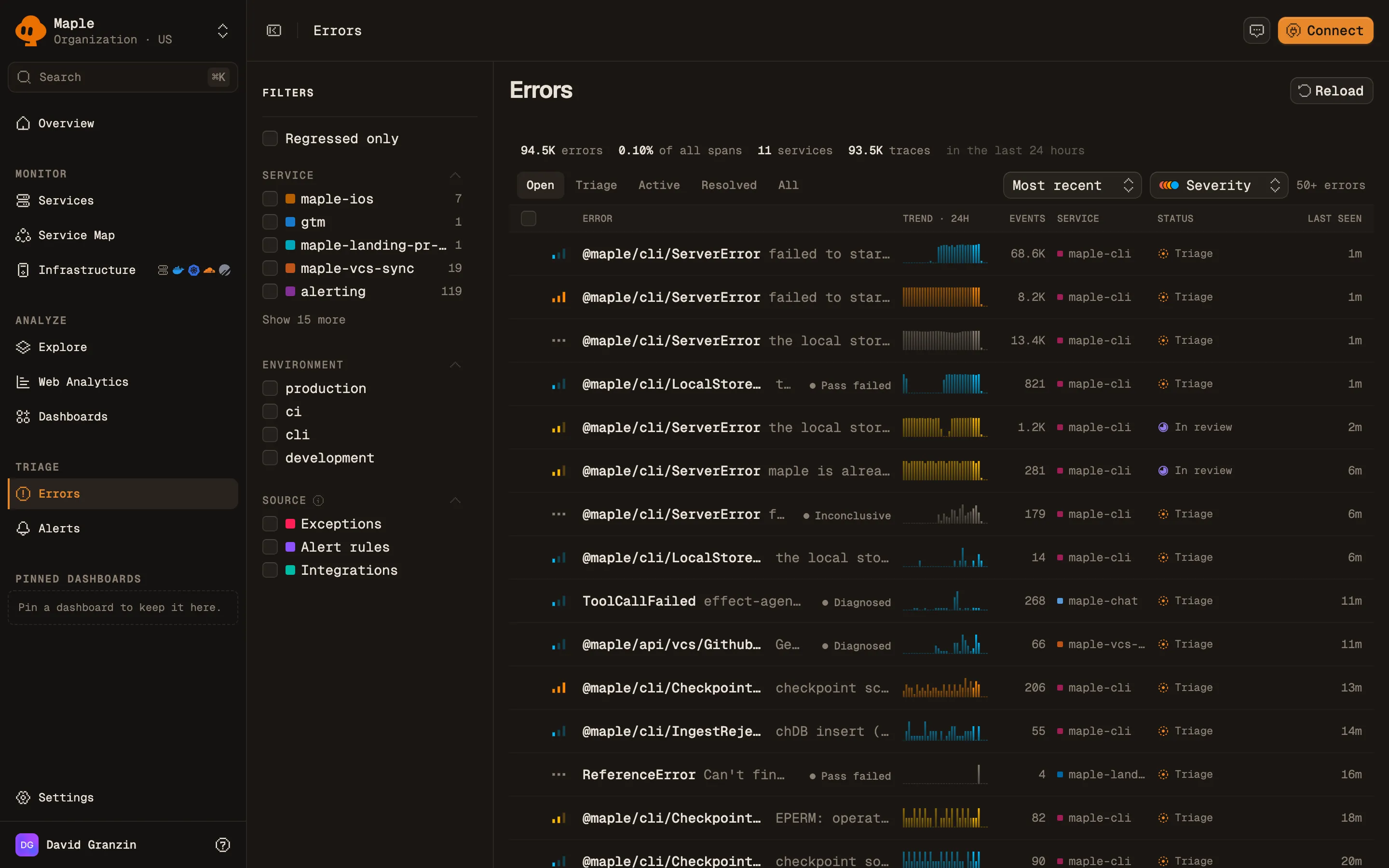
The page opens with a stat strip: error count, share of all spans, and affected services and traces.
The Errors page. Each row is an issue, with its trend over the last 24 hours.
Tabs filter by state:
| Tab | States |
| ------------ | ----------------------------------------------- |
| **Open** | Triage, Regressed, Todo, In progress, In review |
| **Triage** | Triage, Regressed |
| **Active** | Todo, In progress, In review |
| **Resolved** | Done, Cancelled, Won't fix |
| **All** | Every state |
Columns: **Error**, **Trend · 24h**, **Events**, **Service**, **Status**, and **Last seen**. The trend and event counts cover the last 24 hours. The list covers all time.
- Sort by **Most recent** (default), **Most errors**, or **Severity**.
- Filter by severity, and in the sidebar by **Regressed only**, **Service**, **Environment**, and **Source**.
- Select rows to change **Severity** or **Move to** a new state in bulk.
- Right-click a row for **Change status**, **Open in new tab**, **Copy link**, **Copy ID**, and **Copy agent prompt**.
The list loads 50 issues at a time. Click **Load more** for the next page.
## The issue page
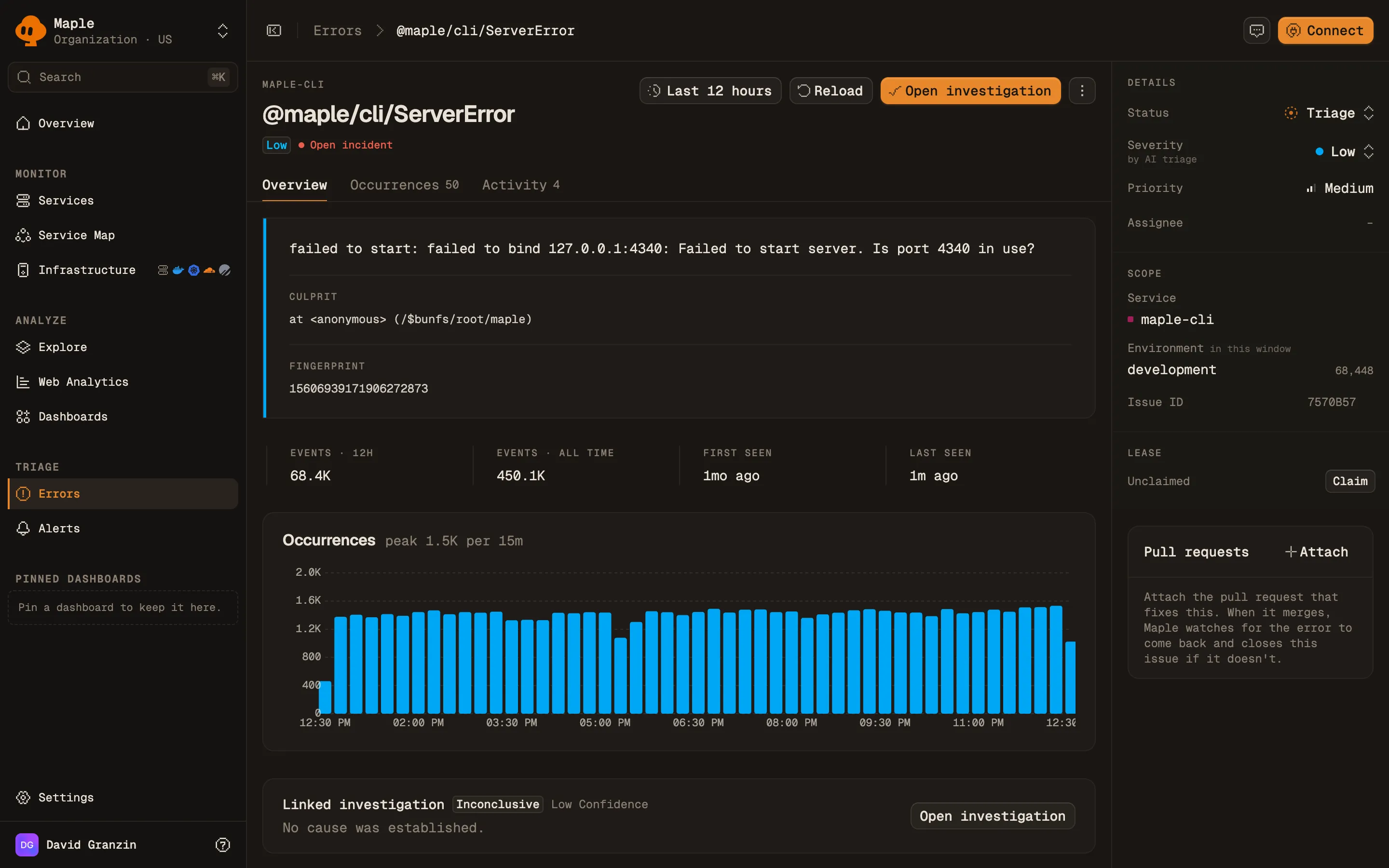
The header shows the service, the error title, severity, state, and an **Open incident** marker while one is open. It has three tabs:
- **Overview**: the **Culprit** (top stack frame) and **Fingerprint**; facts such as **Events · all time**, **First seen**, **Last seen**, and **Regressions**; an occurrence chart; and an **Incidents** table with each incident's status, reason (**First seen**, **Regression**, or **Manual**), and event count.
- **Occurrences**: **Latest occurrences**, with time, service, message, and a link to each trace. Shown for issues from spans.
- **Activity**: a timeline of state changes, claims, and comments. Add a comment with **Comment**. Markdown is supported.
An issue page. The right panel holds state, severity, lease and linked pull requests.
The sidebar holds **Details** (status, severity, assignee), **Scope** (service, environment, issue ID), **Lease**, **Pull requests**, and **Fix verification**.
**Copy agent prompt** copies a prompt with the issue context for a coding agent.
## Work with issues from an assistant
The [MCP server](/docs/reference/mcp) covers the whole workflow:
| Tool | What it does |
| ------------------------------------------ | ---------------------------------------------------------------------- |
| `list_error_issues` | List issues by state, severity, source, service, or last seen time. |
| `find_errors` | Error types with their fingerprints and counts. |
| `error_detail` | Sample occurrences and logs for one fingerprint. |
| `list_error_issue_events` | An issue's activity history. |
| `list_error_incidents` | Incidents under an issue. |
| `claim_error_issue`, `release_error_issue` | Take or give up the lease. |
| `transition_error_issue` | Change state, with an optional `snooze_until` for Won't fix. |
| `set_issue_severity` | Set severity. Never overrides a severity set by hand. |
| `comment_on_error_issue` | Add a comment. |
| `propose_fix` | Claim the issue, move it to In review, and optionally attach a PR URL. |
| `link_pull_request` | Attach a GitHub pull request. Its merge starts fix verification. |
| `update_error_notification_policy` | Change the notification policy (admins only). |
## Troubleshooting
- **Errors show in traces but no issue appears.** A fingerprint needs 3 occurrences to become an issue. Also check that the span status is `Error`, and that a 4xx span carries an exception.
- **Many issues titled "Unknown Error".** Your spans set status `Error` without an exception. Record the exception on the span.
- **One bug is split across many issues.** The message differs in a way the normalizer does not catch, or the stack differs in its top 3 frames. Put variable data in attributes instead of the exception message.
- **A fixed issue keeps regressing.** Old instances are still running. Set `service.version` on your services so occurrences from pre-fix builds do not count as regressions.
- **No notifications arrive.** The policy has no destinations by default. Add one with `update_error_notification_policy`.
## Next steps
- [Traces](/docs/explore/traces): inspect the requests behind an occurrence.
- [Notification destinations](/docs/alerting/notification-destinations): set up Slack, email, and webhooks.
- [GitHub](/docs/integrations/github): attach pull requests and verify fixes.
- [MCP server](/docs/reference/mcp): let a coding agent triage and fix issues.